
This page gives you a free technical documentation template built around three layers, plus a setup file your team can hand to an AI assistant to set the whole thing up on any software project. New build or inherited system, same structure.
The problem it solves is short to state: the knowledge about your product lives in a few people's heads, and that is a business risk you can measure in dollars every time someone leaves, a handover drags, or due diligence discounts what nobody can inspect.
Get the documentation framework
This is the bootstrap file we use to set up project documentation. Hand it to your team, or we will run it with you.
The three-layer technical documentation template
Most project documentation fails because it is either a single giant document nobody maintains or a scattered pile of notes nobody trusts. This template replaces both with three distinct layers, each with a clear purpose and a clear owner.
Sources are the raw inputs, kept exactly as they arrived. Meeting notes, requirements documents, research, audit reports. These are never edited for meaning. They are the record of what was actually said, and everything else points back to them.
Specs are the curated, plain-language description of what each part of the system does. Written so a new person can understand it without asking the original developer. This is the single source of truth. The rule that makes it work: a named human approves every page. It is not auto-generated text nobody vouches for.
Decisions are a short log of choices that matter and why they were made. When someone asks "why is it built this way?", the answer exists and does not need to be re-argued.
The thread running through all three: AI does the heavy, boring work of reading, drafting, and checking. A person approves what becomes the record. The machine is the assistant, not the author of record.
In practice, the ownership is simple:
- Sources are stored as-is when new material arrives. They do not need editorial approval because they are evidence, not interpretation.
- Specs are approved by a named product owner or tech lead whenever the software changes.
- Decisions are approved by the person who made the call, then updated only when the decision is revisited or reversed.
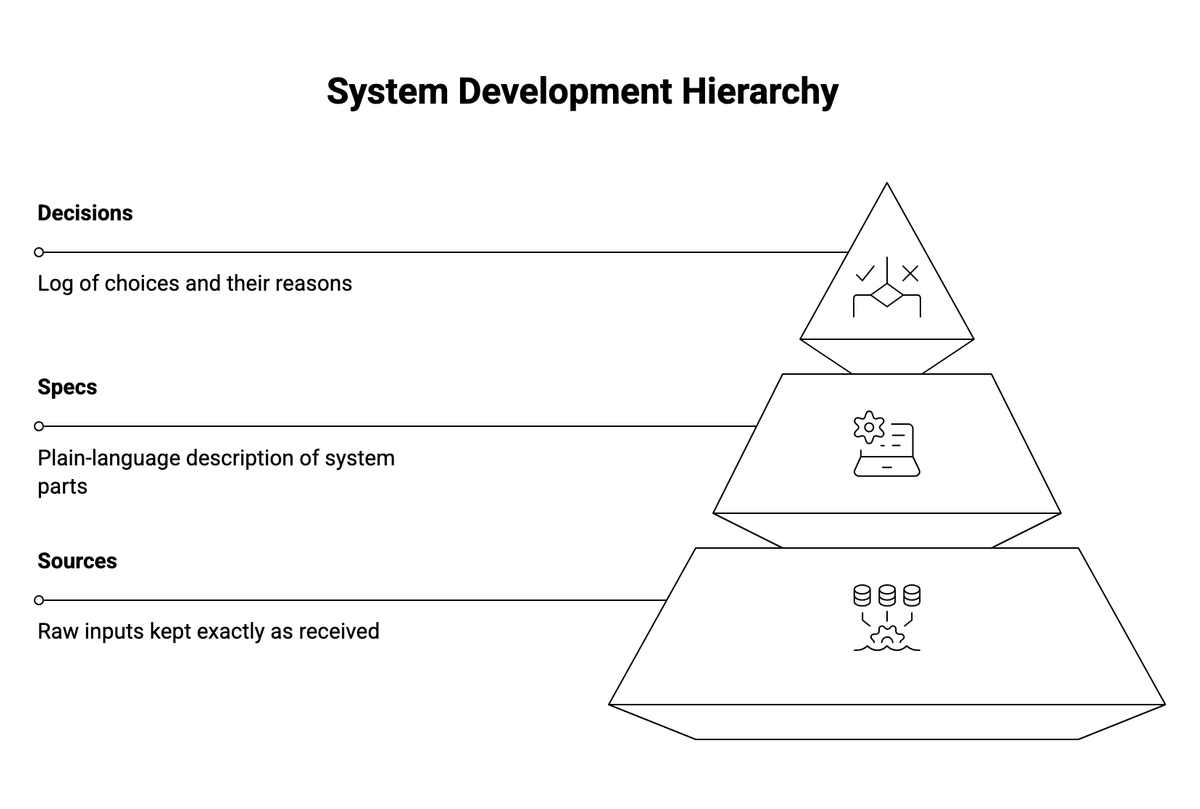
The three layers, with AI as assistant and a person as author of record.
How to use it on a new project
On a new build, the software documentation template grows with the product. The practical setup:
- Create the three-layer folder structure at project start. The free file below does this automatically.
- Drop every brief, meeting note, and requirement into Sources as raw material. Do not clean them up.
- As each module gets built, write its spec page in plain language. One page per module or feature area. Have the product owner or tech lead approve it before it counts.
- Log every meaningful decision in the Decisions layer the week it is made. "We chose Postgres over MongoDB because..." takes five minutes and saves five hours of future debate.
- Assign one person to review the spec layer at the end of each sprint or release cycle. If the software changed and the spec did not, the spec is wrong.
This is the same discipline we apply during custom software development engagements. The structure is simple. The habit of maintaining it is what separates documented projects from undocumented ones.
How to use it on an existing undocumented system
This is the more common and more painful case. You inherited a system, the original team is gone or partially gone, and the documentation is either missing or outdated to the point of being misleading.
The approach is to work backward. You reconstruct the behavior from the code, then confirm it with whoever is still around to ask.
Here is the practical workflow:
- Point an AI assistant at the codebase. It reads through the code, identifies modules, maps data flows, and drafts spec pages far faster than a person could.
- Pull in any existing materials: old wikis, Confluence pages, Slack threads, README files. These go into Sources as raw inputs, regardless of quality.
- A technical person reviews each AI-drafted spec page against the running system. They confirm, correct, or flag gaps. They approve it with their name on it.
- Interview the remaining team members or stakeholders for decisions that are not visible in the code. "Why does the billing module work this way?" often has an answer that matters, and it lives only in someone's memory until you write it down.
- Start with the most business-critical area, not the whole system. Get one section right, then expand.
The result is a written map of a system that previously existed only in code and in memory. That same problem, an older system nobody fully understands, is the subject of our legacy system modernization practice. A proper business analysis pass often runs alongside the documentation effort, since both require the same investigative work.
How the setup file works
The free template is a bootstrap file, not a blank document. It is a set of instructions written for an AI assistant, which means you hand it to your development team or your AI coding tool rather than filling it in yourself.
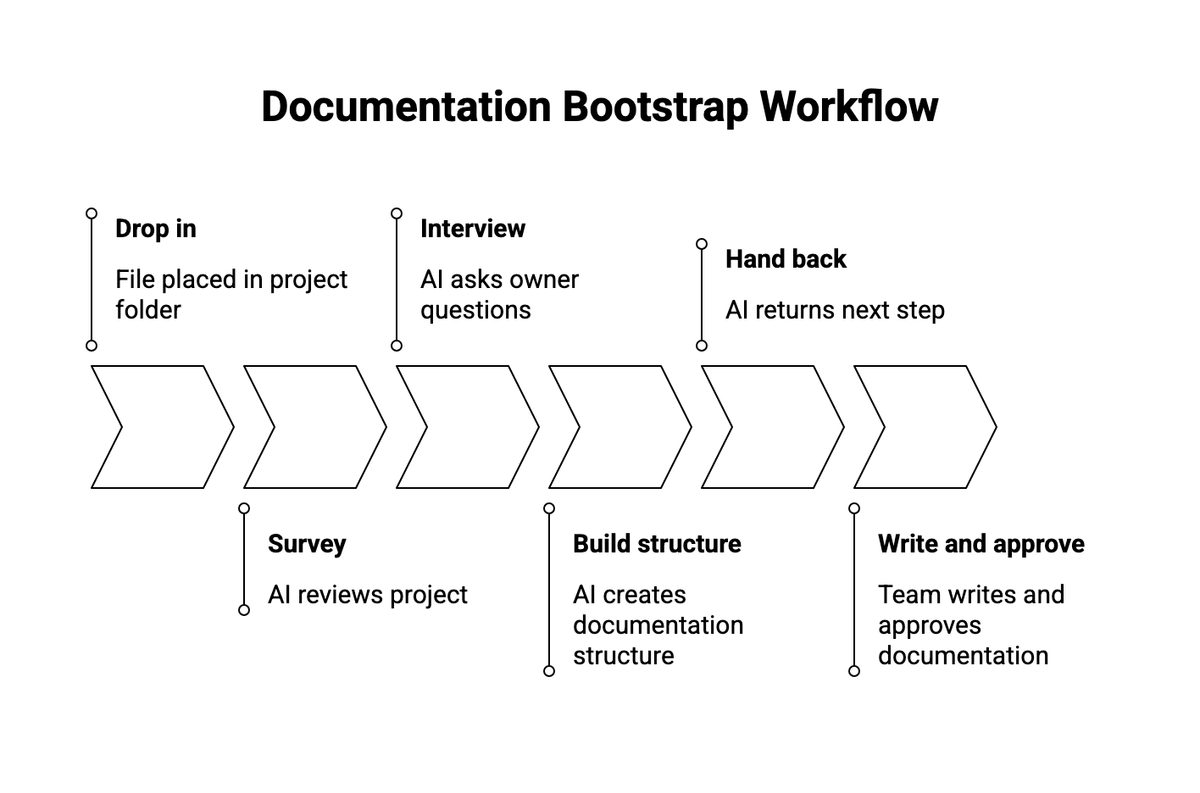
What happens when the file runs
Here is what happens when it runs. The file goes into the project's working folder. An AI assistant reads it and first looks over the project quietly, working out whether it is new or existing, what it is built with, and what documentation already exists. Then it interviews you with around sixteen plain questions: what the product is, who has sign-off authority, what materials already exist to draw from, what the main areas of the product are, and which decisions are already locked and should not be reopened. From your answers it builds the three-layer structure described above and fills it with what it found. Finally it hands back a clear next step, and from there your team writes up one area at a time, with a person approving each page.
One honest note. The file itself is technical. It is written for the AI and the developers, full of setup steps and folder paths, and it is not meant to be read by an owner. You do not need to read it. You need to know that it exists, what it produces, and who on your side will run it. If you do not have a technical team to hand it to, that is something we can do for you.
What to document first
If you try to document everything at once, you will stall. Here is a practical order that works for most projects:
- Product overview. One page: what the product does, who uses it, what problem it solves. This is the page a new hire reads on day one.
- Modules and feature areas. One spec page per major section of the system. Keep each page self-contained enough that someone can read it without reading the others first.
- APIs and integrations. Every external system your software talks to, what data moves, and what breaks if the connection drops.
- Data model. What gets stored, where, and what the relationships are. This is the page that saves the most time during debugging and migration.
- Permissions and roles. Who can do what, and how that is enforced. This is often the least documented and most frequently questioned area.
- Decisions log. Start with the decisions people still argue about. Those are the ones that need a written record most.
You do not need all six on day one. Get the product overview and one module spec approved, and you already have more useful technical documentation than most teams.
Where documentation usually fails
Three failures account for most of it.
Written once, never updated. A stale document is worse than none because people trust it and it quietly lies to them. The reason to let AI carry the upkeep work is precisely that maintenance is what humans abandon. The AI flags drift between the code and the spec. A person decides what to do about it.
Fully automated, never approved. Handing the whole thing to AI with no human sign-off produces a lot of plausible text and nobody accountable for whether it is correct. The approval step is not bureaucracy. It is what makes the project documentation trustworthy.
All at once. The projects that succeed start with one area, get it right, and expand. The ones that stall try to cover everything on day one and finish nothing.
How we can help
We use this technical documentation template on complex and long-running projects, new builds and inherited systems alike. What we have learned is that the structure is the easy part. The discipline is what makes it stick: keeping the raw sources untouched, getting a real person to approve each page, and starting small instead of all at once.
Hand the file to your team and they can run it themselves. If you would rather not, we will set it up and run the first pass with you.
Not sure where to start?
Tell us about your project, new or existing, and we will set up the documentation and run the first pass with you.