
A requirements traceability matrix (RTM) is a table that maps each requirement to the things connected to it: where it came from, the design and code that implement it, the test cases that verify it, and any defects raised against it. Read across a single row and you can answer the question that quietly derails projects: was this requirement actually built, was it tested, and did it pass?
The idea is old and the tooling is unglamorous, which is why a lot of teams skip it. They regret that later, usually at the worst moment, when a tester cannot tell what to check, or a stakeholder asks whether a feature they signed off on ever shipped and nobody can say for sure. This guide covers what goes in an RTM, how to build one, a worked example and a template you can take, and the part most articles ignore: keeping it current once delivery speeds up.
What a traceability matrix actually does
RTM stands for requirements traceability matrix, and the word that matters is traceability. The point is to connect a requirement to everything downstream of it, so nothing gets lost between "the client asked for this" and "we shipped and tested it."
At its simplest the matrix is one row per requirement. Each row carries an ID, a short description, where the requirement came from, how important it is, the test cases that cover it, the current build and test status, and any defects. With that in place you can scan for requirements that have no test, tests that map to no requirement, and features that were agreed but never built. Those three gaps are exactly the ones that hurt in delivery and in audits.
Why it matters: the tester who does not know what to check
Here is the failure the RTM prevents, in the form it usually takes. A developer picks up a task, builds something, and marks it done. Later a tester opens that same task and finds a one-line title and no link back to the requirement it came from or the criteria it was supposed to meet. So they guess. They test what looks reasonable, miss the edge case the requirement actually cared about, and the bug ships.
That is not a people problem. It is a missing link. When a task traces back to a specific requirement and its acceptance criteria, the tester knows precisely what "working" means, and the question "what do I test here?" answers itself. The RTM is where those links live.
Forward, backward, and bidirectional traceability
Traceability runs in two directions, and good projects keep both.
Forward traceability runs from a requirement to its tests. It answers: have we covered everything the client asked for? If a requirement has no test case in its row, you have found a coverage gap before the client does.
Backward traceability runs the other way, from a test or a piece of code back to the requirement that justifies it. It answers: why does this exist? Code with no requirement behind it is either an undocumented requirement you need to capture or scope nobody asked for.
Bidirectional traceability is simply keeping both links live at once. That is what lets you start from any point, a requirement, a test, a defect, and walk to everything related to it. It is more work to maintain, and it is the version that actually pays off when something changes.
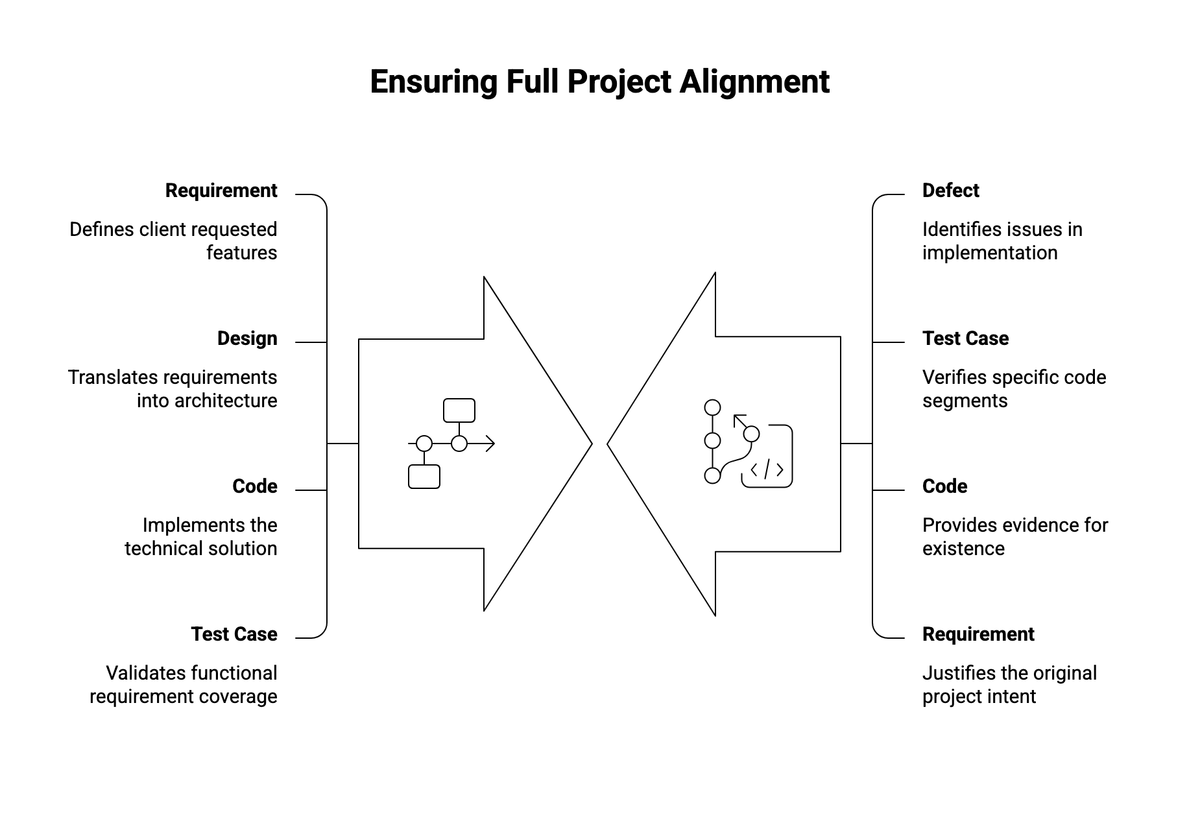
Forward traceability finds coverage gaps; backward traceability finds scope nobody asked for. Bidirectional keeps both live.
What goes in an RTM: the columns
A workable matrix does not need many columns. Most teams use some version of these:
- Requirement ID, unique and stable, so everything else can point to it.
- Requirement description, short and in plain language.
- Source, the document, meeting, or stakeholder the requirement came from.
- Priority, so you know what matters most when time runs short.
- Design or build reference, linking to the spec or the component that implements it.
- Test case IDs, the tests that verify the requirement.
- Status, whether it is built, tested, and passing.
- Defect IDs, any bugs raised against it.
You can add columns for a sprint, an owner, or a compliance reference if your context needs them. Resist the urge to add more than you will keep updated. A matrix with ten columns that nobody maintains is worse than four columns that stay accurate.
A worked example
A short example makes the shape clear. Imagine a login feature with a few requirements:
| Req ID | Requirement | Priority | Test cases | Status | Defects |
|---|---|---|---|---|---|
| R-01 | User can log in with email and password | High | TC-01, TC-02 | Tested, passing | none |
| R-02 | Account locks after five failed attempts | High | TC-03 | Built, not tested | none |
| R-03 | User can reset a forgotten password | Medium | (none) | Built | none |
Read the rows and the gaps jump out. R-02 is built but not yet tested. R-03 has no test case at all, which means nobody has confirmed the reset flow works. Neither problem is obvious in a task board. Both are obvious in one glance at the matrix.
How to create a requirements traceability matrix
- List every requirement and give each one a unique ID. This is the spine the rest hangs off, so keep the IDs stable even as wording changes.
- Add source and priority. Knowing where a requirement came from helps when it is questioned later, and priority tells you what to protect when scope gets cut.
- Link design and build. Point each requirement at the spec or component that implements it.
- Link test cases. Attach the tests that verify each requirement, and flag any requirement that has none.
- Record status and defects. Mark what is built, tested, and passing, and connect any bugs back to the requirement they violate.
- Keep it current. Update the row whenever a requirement, test, or defect changes. This is the step everyone agrees to and few actually do, which is the subject of the last two sections.
Using the example as a template
You do not need a special tool to start. The example above is the template: copy those columns into a spreadsheet, drop your own requirements into the rows, and adjust the headers to fit how your team works. Add a column if your context needs one, but keep it to what you will actually maintain.
A starter grid gets you going. It does not solve the real problem, which is what happens to the matrix three sprints from now.
Linking requirements to test cases and coverage
The matrix is also how you measure test coverage in terms that matter to the business. Tooling can tell you what percentage of code lines a test suite touches. That is useful, and it is not the same thing as knowing whether every requirement has been verified. A codebase can have high line coverage and still leave a requirement completely untested, because coverage counts code, not intent.
Requirement coverage is the count the RTM gives you: how many requirements have at least one passing test. It is the number worth reporting to a stakeholder, because it answers their actual question, which is whether the thing they asked for works.
Impact analysis when a requirement changes
The other payoff comes when something changes, which on a real project is constantly. A stakeholder revises a requirement. Without traceability, working out what that change affects means a developer searching the code from memory and hoping they found everything. With a maintained matrix, you read the row: here are the design elements, the code, and the test cases tied to this requirement, so here is exactly what we need to update and re-test.
That is impact analysis, and it turns a risky guess into a lookup. It is also the moment the maintenance effort pays for itself, because the cost of missing an affected component is a bug in production.
The hard part: keeping the matrix current
Here is the honest problem with the RTM. Maintained by hand in a spreadsheet, it goes stale the moment delivery picks up. Someone changes a requirement in a planning tool, the code moves, a test is added, and the matrix sits in a tab nobody has opened in a month. A stale traceability matrix is worse than none, because people trust it and it lies to them.
This is why so many teams build one at the start of a project, show it in a status review, and quietly abandon it. The artifact is sound. The manual upkeep is what fails.
How AI keeps traceability current
The way to fix the upkeep is to stop treating the matrix as a document people transcribe into, and start treating traceability as links between records that a model can read and check.
On a recent engagement we did exactly this. The requirements were written as plain-language descriptions, each one linked to its acceptance criteria. Tests and defects pointed back to the specific criteria they covered or violated, so a bug was never just a bug; it was attached to the requirement it broke. We kept all of this as linked notes in Obsidian, alongside the actual codebase, and used Claude to read across the lot. A developer could open the requirement map and the source code together in Cursor and ask how a given feature was implemented and whether it still matched what the requirement said.
The maintenance came from the model, not from a person updating cells. An automated check ran over the linked records and flagged where traceability had broken: a requirement with no test, a test pointing at a requirement that had since changed, a description that now contradicted another. It raised those as questions for a human to resolve rather than fixing them silently, which kept the record honest. The effect was the one teams want from an RTM and rarely get: the tester opened a task and could see what it was supposed to do, because the link back to the requirement was always there.
None of this is magic, and it does not remove the human judgment about what a requirement really means. What it removes is the transcription work that makes traditional RTMs rot.
RTM and compliance
In regulated fields, traceability is not optional. Medical devices, aerospace, finance, and other audited industries require evidence that every requirement was implemented and tested, and a requirements traceability matrix is often the artifact auditors ask for by name. If you work in one of these areas, the matrix is less a project aid and more a deliverable, and keeping it current is a regulatory concern rather than a nice-to-have.
How we approach it in practice
The mistake we see most is a matrix built once, shown in a kickoff review, and never touched again, which is worse than not having one because people keep trusting it. The practical fix is to keep it small enough to actually maintain and wire it into the work rather than parking it in a separate spreadsheet. Start with the few columns you will really update, link tasks back to requirements as the work happens instead of reconstructing the links afterward, and decide early who owns keeping it current. On the projects where we maintain traceability with a model rather than by hand, the win is not that the matrix is fancier. It is that it stops going stale, which is the only thing that has ever killed an RTM. If your team needs this kept honest at speed, it is work we do.
Where to start
If your team ships features that later turn out to be untested, or you cannot quickly answer what a requirement change will affect, the missing piece is traceability, not more meetings. Start with the example grid above, keep it honest for one project, and decide from there whether you want the links maintained by hand or by a model. If you are modernizing an older system where the requirements were never written down in the first place, that is a related problem we cover in our guide to legacy system modernization.