
B2B ecommerce development means building digital buying workflows for companies, not individual shoppers. The visible storefront is only one layer. The harder work sits behind it: account structures, negotiated pricing, approval rules, quote cycles, payment terms, ERP data, and sales handoffs. A B2C store can sell products online; a B2B commerce system has to sell the right products, at the right price, to the right buyer inside the right company.
B2B demand has already moved online. The International Trade Administration expects the global B2B ecommerce market to reach about $36 trillion by 2026. McKinsey also found that many B2B buyers now use ten or more channels during supplier interactions, and large online purchases are no longer rare: 77% were willing to spend $50,000 or more through remote or online channels.
That shift changes what a commerce platform has to do. A buyer may need access to a private catalog. Their manager may need to approve the order. The price may depend on a contract, region, volume tier, currency, or quote history. Sales reps still matter, but buyers expect self-service for routine work.
The mistake is treating this as a theme, plugin, or checkout problem. Most failed B2B ecommerce projects fail earlier, in the business rules. If those rules are unclear, the platform starts simple and then bends under exceptions. The result is manual price overrides, duplicate customer records, frustrated buyers, and sales teams that keep working around the system.
What makes B2B ecommerce development different from B2C commerce
B2B ecommerce is different because the buyer is usually an organization, not a single person. That one change affects identity, pricing, catalogs, checkout, fulfillment, returns, and reporting. The platform has to model how the customer actually buys, including departments, locations, approval limits, contracts, and repeat ordering patterns.
In B2C, the account model is usually simple: one shopper, one cart, one payment method, one delivery address, one purchase history. In B2B, a single customer can be a parent company with subsidiaries, branches, buyers, approvers, finance users, warehouse managers, and sales reps attached to it.
That structure affects access. One user may be allowed to browse only spare parts. Another may place orders up to $5,000. A purchasing manager may approve orders for several locations. A finance user may only download invoices. Sales reps may need to impersonate accounts, build carts, send quotes, or see account-specific activity.
Pricing is another major split. B2C pricing is usually public and immediate. B2B pricing often depends on contracts, customer groups, volume breaks, region, freight rules, rebates, tax exemptions, promotions, and negotiated exceptions. The same SKU may show different prices to different buyers, and those prices must match ERP or finance records.
Order flow is rarely one click. A buyer may request a quote, revise it, submit it for approval, convert it to an order, split shipments across branches, attach a purchase order, and reorder the same basket every month. The platform needs to support that process without turning every exception into a support ticket.
This is why ecommerce ERP integration matters so much in B2B. The storefront cannot invent truth about customers, stock, credit, tax, or invoices. It has to exchange data with the systems that already run the business.
Where B2C platforms usually break in B2B ecommerce development
B2C platforms usually break when they assume every visitor sees the same catalog, pays the same way, and buys as an individual. Those assumptions work for retail but strain under contract pricing, shared accounts, approval chains, quote workflows, credit limits, and ERP-driven fulfillment rules.
Many B2C platforms can be extended. Shopify, WooCommerce, Magento, BigCommerce, and custom storefronts can all support some B2B scenarios. The issue is whether the platform's core model fits the operating model of the business.
A plugin can add a quote form. Another plugin can hide prices. Another can create customer groups. That may work for a small wholesaler. It starts to fail when pricing has exceptions, customer hierarchies have depth, stock comes from several systems, or sales reps need full account context.
| B2C assumption | B2B requirement | Build implication |
|---|---|---|
| One user owns one account | Many users belong to one company or buying group | Build company accounts, roles, permissions, and delegated admin |
| Same price for most buyers | Contract, tier, region, and volume pricing | Create a pricing engine or reliable ERP price lookup |
| Public catalog | Customer-specific products and restricted SKUs | Add catalog visibility rules tied to account data |
| Simple cart checkout | Quotes, approvals, purchase orders, and credit terms | Support quote-to-order and approval states |
| Card payment at checkout | Invoice, ACH, credit line, PO, card, or mixed terms | Build payment term logic and credit checks |
| Single shipping flow | Split shipments, warehouse routing, freight rules | Connect order flow to inventory and fulfillment logic |
| Basic returns | RMAs, warranty rules, restocking, replacement parts | Model returns as an operations process |
| Customer support owns exceptions | Sales reps co-sell, quote, review, and manage accounts | Give reps account tools inside the commerce flow |
Buyer expectations are also higher than many teams assume. McKinsey's 2021 B2B research found that buyers wanted in-person, remote, and digital self-serve channels in roughly equal measure, and ecommerce was the most commonly cited effective sales route in that survey. The buying process is now mixed by default.
That creates a hard product question: should the site replace the sales team, support the sales team, or automate only repeat orders? A distributor that lives on repeat orders may need fast reorder, saved lists, invoice access, and contract prices. A manufacturer with engineered products may need guided configuration, quote review, and sales-assisted checkout.
Generic B2C workflows break because they flatten these differences. Good B2B systems make them explicit.
Core modules to plan before b2b ecommerce website development starts
Before b2b ecommerce website development starts, define the modules that carry business rules: accounts, pricing, catalog access, quote-to-order, checkout terms, ERP sync, admin tools, and audit trails. These decisions should happen before UX polish because they set the data model and prevent expensive rework later.
Start with customer accounts. Map how companies, branches, departments, users, buyers, approvers, finance contacts, and sales reps relate to each other. Decide who can create users, assign roles, approve orders, see invoices, view net prices, manage shipping addresses, and reorder for a location.
Next, define the catalog and pricing engine. This includes SKU visibility, product substitutions, bundles, minimum order quantities, unit-of-measure conversions, volume breaks, contract prices, regional limits, and customer-specific assortments. If the ERP owns pricing, decide whether the storefront caches prices, calls the ERP in real time, or uses a hybrid model.
Quote-to-order deserves its own planning. A quote is not a cart with a different label. It may have expiration dates, negotiated line items, attachments, comments, approvals, version history, margin review, sales owner rules, and conversion logic. Buyers also need a clean way to move from quote to order without losing terms.
Checkout has to support payment terms. Some accounts pay by invoice. Some use credit cards for small orders and purchase orders for larger ones. Some need tax exemption certificates or freight account numbers. Some can order only inside an approved budget.
Inventory and fulfillment must be designed with care. B2B buyers often care about available-to-promise, lead times, backorders, partial shipments, substitutions, pickup locations, export rules, and freight estimates. If fulfillment is already a bottleneck, connect the ecommerce plan to order fulfillment software decisions early.
Sales and admin tools matter because B2B commerce rarely runs without humans. Reps may need to build carts, send quotes, apply approved discounts, and see customer activity. Admin teams need clean tools for catalog changes, approvals, returns, invoices, and failed sync jobs.
This is also where business analysis services can save money. A short discovery phase that maps data, roles, and exceptions often costs less than rebuilding checkout after launch.
Build, customize, or go headless: how to choose the architecture
Choose the architecture by looking at rule complexity, integration depth, checkout flow, and future ownership. A standard platform is fine when rules are light. Headless or composable builds fit teams that need flexible frontends and strong back-office systems. Custom modules fit when ERP and pricing logic drive most of the experience.
Platform customization is often the right first move for simpler B2B sellers. If the catalog is small, pricing tiers are simple, and checkout uses standard payment methods, a known ecommerce platform can get the business online faster. Planning ranges vary, but a simple B2B storefront customization may take 8 to 14 weeks when data is clean and integrations are limited.
That path has limits. The more you rely on plugins for core rules, the harder maintenance becomes. Updates become risky when quote, role, price, and order sync logic is spread across components that were not designed as one system.
A headless setup works when the storefront experience needs more control while commerce, CMS, ERP, search, or PIM systems stay separate. It can be a strong fit for manufacturers and distributors with complex catalogs, multiple brands, regional sites, or channel-specific experiences. The tradeoff is more engineering ownership. Teams considering this route should understand the pattern behind headless ecommerce before committing.
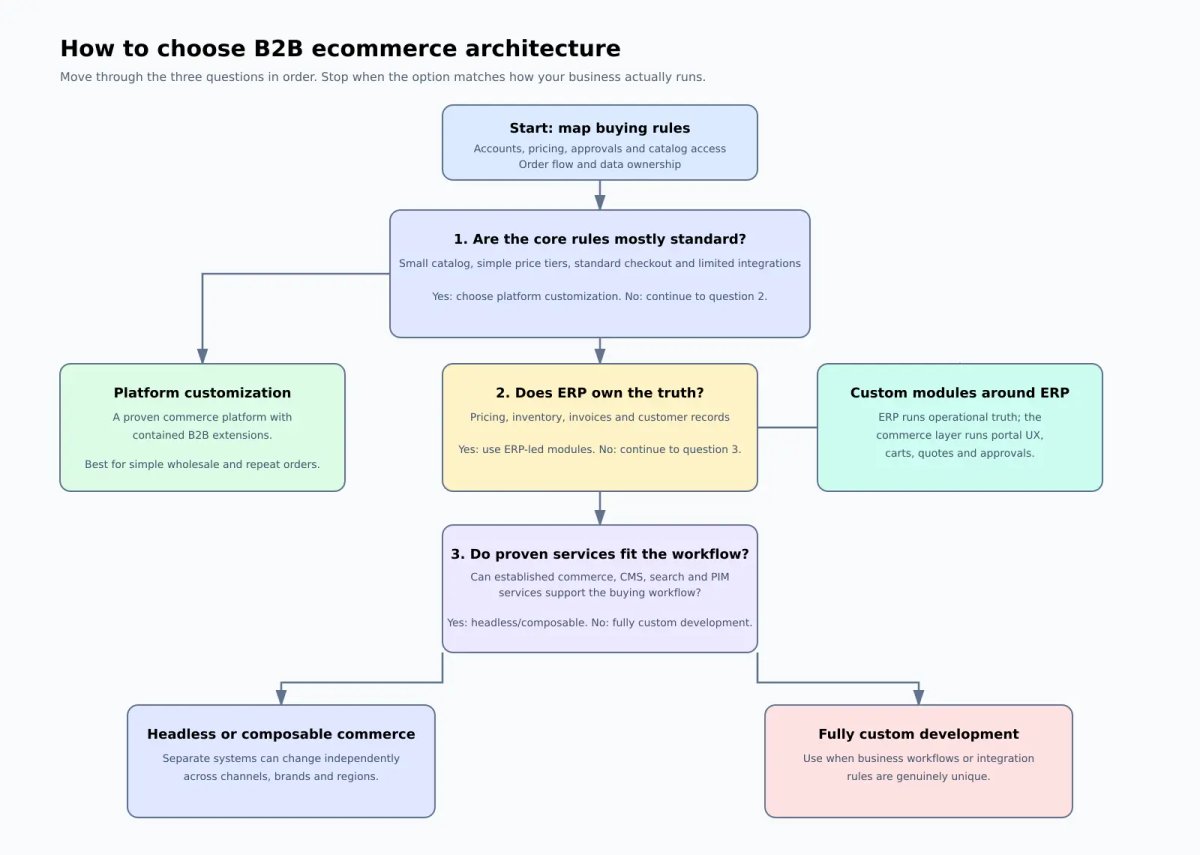
Custom modules around ERP make sense when the ERP is the source of truth and the storefront is more of a buying portal. This is common in wholesale, distribution, industrial supply, and manufacturing. The commerce layer may handle UX, carts, quotes, and approvals while ERP handles accounts, inventory, invoices, and price calculations.
Fully custom development is not always needed. If checkout is simple, avoid overbuilding. If only 10% of customers need quote workflows, do not force every buyer through a slow process. If pricing changes once a quarter, a nightly sync may be enough.
For integration-heavy work, planning ranges often move into 4 to 9 months, and large multi-entity commerce programs can run longer. Cost follows scope. Low-complexity customization often starts in the low five figures, while integration-heavy custom work can move into six figures. Treat these as planning ranges, not promises.
If your catalog, pricing, and ERP rules are already bigger than your storefront, Attract Group can map the workflows before code through business analysis or custom ecommerce development.
A practical B2B ecommerce development roadmap
A practical roadmap starts with business rules, then moves to ordering, integrations, automation, self-service, and optimization. Do not begin with a full feature wishlist. Start with the buying flow that creates revenue, then add the account and operations features that reduce manual work without making the first release too large.
Phase 1 is discovery and data modeling. Map account structures, customer groups, pricing sources, catalog rules, order types, approval flows, tax rules, payment terms, and ERP ownership. Many teams find that their offline process is less standardized than they thought. That is useful to learn before code starts.
Phase 2 is MVP ordering. Pick the buyer group and order type that matter most. For a distributor, this might be repeat orders from approved buyers. For a manufacturer, it might be quote requests for configured products. Build the smallest workflow that supports real customers, real prices, real catalog visibility, and real order capture.
Phase 3 is ERP and quote automation. Sync customers, products, prices, stock, orders, invoices, and shipment status. Add quote versioning, approvals, sales review, and conversion to order. If ERP rules are messy, build monitoring and admin tools for sync failures. Silent failures are expensive in B2B because they create bad prices, missed orders, and support load.
Phase 4 is account self-service. Add saved lists, reorder flows, invoice downloads, order history, budget controls, user management, shipping address books, return requests, and sales rep visibility. This is where the site starts to reduce routine calls and emails.
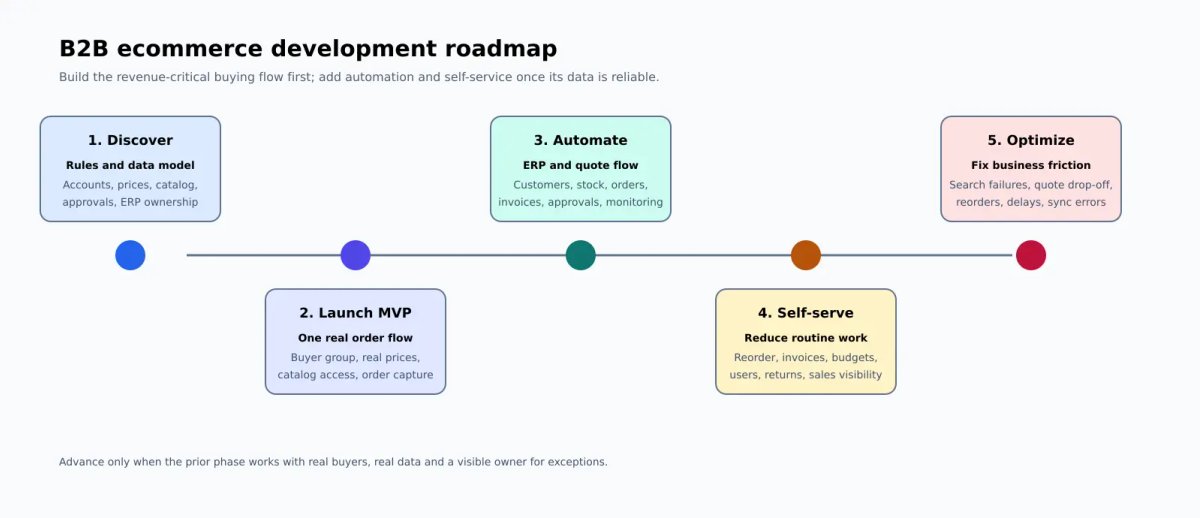
Phase 5 is optimization. Watch search usage, failed searches, quote abandonment, reorder rate, approval delays, pricing errors, and sync problems. Baymard's B2B ecommerce UX research is useful here because it is based on a large body of B2B ecommerce usability findings, including testing across industrial and technical categories.
Case work can help frame the scope. In the Touchstone Essentials project, Attract Group delivered role-based pricing, autoship subscriptions, referral storefronts, and external order-management integration. The lesson is not that every B2B build needs those exact features. The lesson is that account logic and operations logic should be treated as product features, not back-office details.
For existing stores, modernization can be enough. The Infento ecommerce work included performance tuning, account UX improvements, currency conversion, online invoicing, order export, and organization purchases on a WooCommerce base. That kind of project can be a better path than replacing the whole platform when the core stack still fits.
The roadmap should stay tied to business pressure. If sales reps spend hours re-entering orders, automate order capture. If buyers complain about price mismatches, fix pricing source and display logic. If customer service is flooded with invoice requests, build invoice self-service. Good B2B ecommerce development solves the work behind the order, not only the screen in front of the buyer.