
AI consulting for small businesses works best when it starts with one workflow, one owner, one metric, and a capped pilot. The wrong first move is usually a custom model, a vague chatbot, or a company-wide AI transformation. The better first move is narrower: find a repeatable process, confirm the data is usable, test AI with human review, and decide whether the result deserves more budget.
AI adoption is already moving through small businesses. The U.S. Chamber reports that 58% of small businesses self-identified as using generative AI in 2025, up from 40% in 2024 and 23% in 2023. That does not mean every business needs custom AI software. It means owners need a practical way to separate useful automation from expensive experiments.
What AI Consulting for Small Businesses Should Actually Deliver
A good first engagement should produce operating decisions, not a slide deck that says AI is important.
Useful AI consulting for small businesses should cover:
- A use-case map of repeated workflows where AI could reduce manual work, shorten response time, or improve consistency
- A workflow audit showing who does the work today, what systems are involved, and where errors or delays happen
- A data and access review, including where source data lives, who owns it, and whether it is clean enough to use
- Tool selection across SaaS products, automation platforms, custom integrations, and custom AI
- A pilot plan with scope, budget, timeline, owner, and success metric
- Integration requirements for CRM, help desk, accounting, document storage, ecommerce, or internal systems
- Governance rules for human review, escalation, permissions, logging, and data retention
- Measurement after launch, so the business can decide whether to scale, revise, or stop
That is the practical version of what AI consulting should cover. The consultant should help you choose the smallest useful project, test it in the real workflow, and avoid building technology before the business case is proven.
Data readiness matters here. If your support articles are outdated, your CRM fields are inconsistent, or your invoices arrive in six different formats, the first project may need cleanup before automation. Attract Group has covered this in more depth in its guide to data readiness, but the short version is simple: AI quality depends on the quality of the process and data around it.
The Best First AI Projects Under $50K
Planning ranges are not promises. Scope, systems, security needs, data quality, and review rules can move the budget. Still, many small business AI consulting engagements can start under $50K when the pilot is narrow.
| Project | When it pays off | Typical first-scope budget | What to measure | What to avoid |
|---|---|---|---|---|
| AI customer support assistant | Knowledge base and ticket history already exist | $8K-$25K | Deflection, time to first response, escalation quality | Unsupervised account changes |
| Sales/admin assistant | Lead triage, call notes, quote drafts, and CRM hygiene consume rep time | $10K-$30K | Rep time saved, response speed, quote accuracy | Replacing judgment-heavy sales calls |
| Document intake and extraction | Invoices, forms, applications, claims, or onboarding paperwork arrive often | $15K-$40K | Touchless extraction rate, review time, error rate | Low-volume documents with many edge cases |
| Internal knowledge search/RAG | SOPs, policies, training, and support docs are used often | $15K-$45K | Answer accuracy, search time, repeated questions | Stale, unowned documents |
| Forecasting or scoring pilot | Clean history exists for sales, inventory, staffing, or demand | $20K-$50K | Forecast error, lead conversion lift, inventory or staffing accuracy | Predictive work when data is too thin |
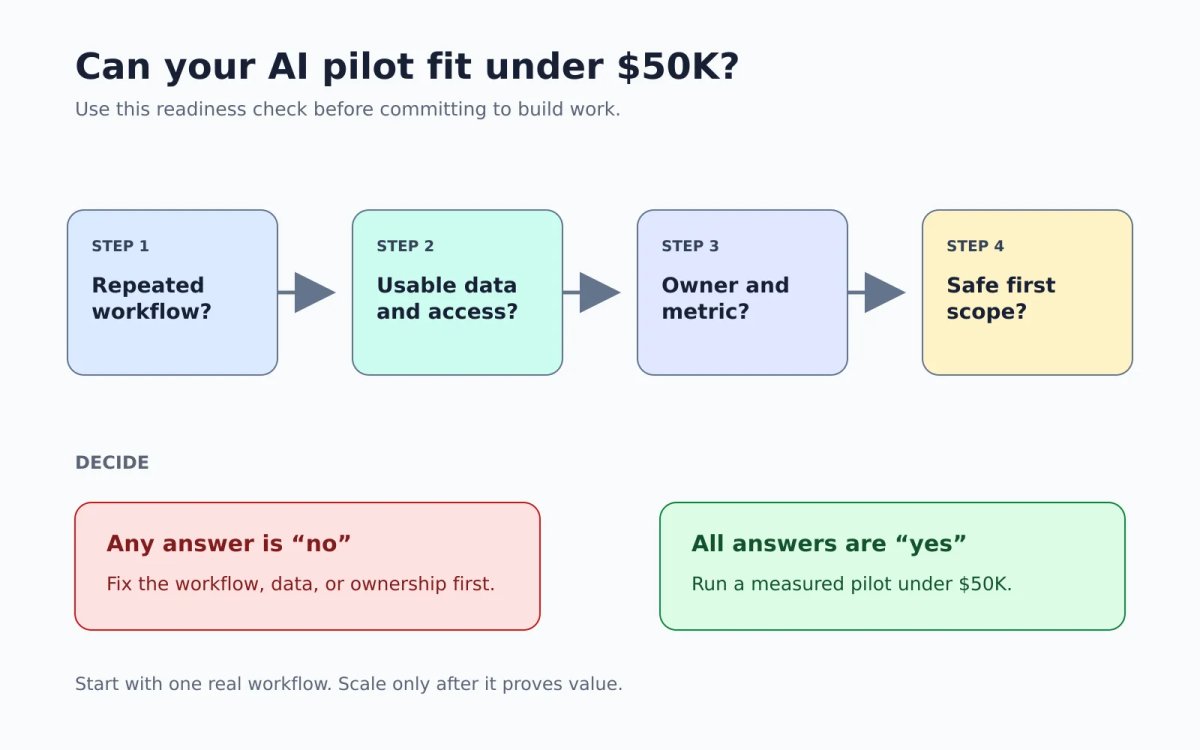
The best first project is usually close to revenue, service quality, or operational throughput. It should also connect to systems people already use. That may mean integrating AI into existing systems rather than asking employees to adopt another standalone tool.
For example, Attract Group delivered a logistics CRM for Movewheels that centralized lead intake, telephony, email, quotes, payments, route and distance support, and manager dashboards. The case page lists a $20,000 to $50,000 budget range and 3 to 5 month timeline. That is not an AI case study, but it shows the point: automation performs better when the workflow, data, and integrations are understood before new intelligence is added.
What Small Businesses Should Skip at First
The first AI budget should avoid projects that sound impressive but have poor odds of paying back quickly.
Most small businesses should skip:
- Custom foundation models
- Full autonomous agents with broad permissions
- Replacing a whole team
- AI for every department at once
- Dashboards that do not change a workflow
- Pilots with no internal owner
- Predictive models without clean history
- Chatbots that are launched before content and escalation paths are ready
The decision is often SaaS first, integration second, custom build third.
Use SaaS when the workflow is common and the tool already handles most of it. Customer support, meeting notes, transcription, marketing drafts, and simple reporting often fit this category.
Use integration when the workflow spans several systems and the work is being slowed down by handoffs. This is common in sales operations, service desks, finance admin, and logistics.
Use custom AI when the workflow is specific to your business, the data creates an advantage, and off-the-shelf tools cannot handle the required process, security, or integration depth. That is when custom AI solutions can make sense.
Be careful with agents. AI agents can be useful when they have a narrow job, clear permissions, and human review for risky actions. They are a poor first project when the business wants them to "run operations" without clean data, process rules, or exception handling. If you are considering agents, start with a bounded workflow like draft preparation, record lookup, ticket routing, or follow-up reminders.
How to Choose an AI Consultant for a Small Business
The right AI consultant for small business work should ask about workflows before models. If the first conversation jumps straight to model names, custom training, or broad transformation language, slow down.
Look for a consultant who:
- Maps the current workflow before recommending software
- Can work inside your existing CRM, help desk, accounting, storage, and reporting tools
- Designs human review for mistakes, edge cases, and sensitive decisions
- Prices discovery separately from build work
- Explains data, privacy, cybersecurity, bias, and accuracy risks in plain language
- Sets a success metric before the pilot starts
- Leaves documentation, ownership notes, and handoff materials
- Can tell you when a SaaS tool is enough
The SBA guide to AI for small business points to benefits as well as risks, including privacy, cybersecurity, bias, and accuracy concerns. The New Zealand NCSC guide gives practical security advice, including thinking carefully about the data shared with AI tools and using basic security controls.
Ask these questions before hiring for AI consulting services for small businesses:
- Which workflow should we not automate?
- What data do you need before quoting build work?
- What happens if the model is wrong?
- Who owns prompts, code, data, and integrations?
- What will we measure after 30 days?
- Can this start in our current tools before we build anything custom?
- What information should never be sent to an AI tool?
If the work touches systems, permissions, security, or process redesign, combine AI advice with practical IT consulting. AI is rarely isolated from the rest of the business stack.
A 30-Day Plan Before You Spend More
A first engagement does not need to run for six months. For many small businesses, 30 days is enough to decide whether a pilot deserves deeper investment.
Week 1: choose the workflow and metric. Pick one workflow with visible volume, cost, delay, or error rate. Name the owner. Decide what success means: time saved, response time, error reduction, quote speed, deflection, conversion lift, or fewer manual touches.
Week 2: audit systems, data, permissions, and security. List the systems involved. Review sample records, documents, tickets, calls, or messages. Check access rules. Decide what data can be used, what must be masked, and where human review is required.
Week 3: prototype in existing tools or with a narrow integration. Start small. This might be a support draft assistant, document extraction workflow, internal knowledge search, CRM cleanup helper, or scoring model using a limited data set. The goal is to test workflow fit, not polish every feature.
Week 4: pilot with human review, measure, and decide. Run the pilot with real users and real work. Track the metric chosen in week 1. Review errors. Ask whether the workflow improved enough to scale. If not, change the scope or stop.
McKinsey's State of AI 2025 makes a similar point at a larger scale: adoption is broad, but impact depends on management practices, value tracking, human validation, operating model, data, technology, and adoption work. Small businesses need the same discipline, only with tighter scope and less waste.
Many businesses do not need a custom build until the workflow proves value. The first win may come from better process design, cleaner data, and a small integration around an existing tool.