The best fitness app features are not the ones that sound impressive on a pitch deck. They are the ones that help a user complete a workout, see progress, and come back next week. That distinction matters because most fitness apps lose the majority of their users within 30 days. The features you choose for launch directly shape whether people stay or leave.
This guide is for founders, product leads, fitness operators, and wellness businesses deciding what to build first and what to postpone. It covers MVP scope, advanced retention features, cost and timeline impact, data and compliance decisions, and a phased build plan.
Start with the user job, not a feature list
Before listing features, define the product you are actually building. "Fitness app" covers a wide range of user jobs, and each one changes your feature priorities:
- Workout tracker. Users log exercises, sets, reps, and duration. The product is a structured record.
- Coaching app. Users follow guided programs adapted to their goals, fitness level, and schedule.
- Gym or studio app. Members book classes, check schedules, manage memberships, and interact with their facility.
- Nutrition app. Users track meals, macros, calories, and dietary goals alongside or independent of exercise.
- Wellness app. Broader scope including sleep, stress, recovery, and habit tracking.
- Wearable companion. The app exists primarily to interpret and display data from a device.
Each of these products has a different core loop, a different retention driver, and a different technical stack. A gym booking app needs scheduling, payments, and push notifications before it needs AI coaching. A coaching app needs adaptive programming before it needs social feeds.
Clarify the user job first. Then select features that serve it.
Core fitness app features for an MVP
A fitness app MVP should do one thing well and prove that users will return. Below are the features that most fitness app MVPs need, regardless of the specific product type.
Onboarding and goal setting. Collect the minimum information needed to personalize the first session: fitness level, goals, available equipment, schedule preferences. A short onboarding flow (3-5 screens) reduces drop-off and gives the user a quick first win.
User profile. Store personal data, preferences, and settings. Keep it simple. You do not need a social profile at launch.
Workout library and plans. A structured set of workouts or programs the user can follow. For a coaching app, this is the product. For a tracker, this is optional but increases engagement. Content can be static at launch and made dynamic later.
Tracking and logging. Let users record what they did: exercises, sets, reps, weight, duration, or activity type. This is the minimum data layer that makes progress visible.
Progress dashboard. Show users what they have accomplished over time. Charts, streaks, personal records, or simple summaries. Progress visibility is one of the strongest retention signals in fitness apps.
Reminders and notifications. Scheduled reminders tied to the user's plan. Keep them useful and infrequent. Spammy notifications accelerate churn.
Subscription and payments. If your model is subscription-based (and most fitness apps are), integrate payment processing from day one. Apple and Google in-app purchase flows are standard. Plan for free trials, annual vs. monthly pricing, and cancellation handling.
Admin and content management tools. Your team needs a way to add workouts, manage users, review analytics, and update content without deploying code. A lightweight admin panel or CMS integration saves significant time post-launch.
These features form the functional baseline. They are not exciting on their own, but without them, advanced features have nothing to attach to.
Ready to build your game-changing fitness app?
Our expert developers can help you create a customized fitness application with all the essential features to engage and retain users.
Advanced features that improve retention
Once the core loop works, these features address the reasons users leave: lack of motivation, insufficient personalization, no accountability, and boredom.
Personalization and adaptive plans
Static workout plans lose effectiveness as users progress or as their schedules change. Adaptive programming adjusts based on completed workouts, missed sessions, reported difficulty, and stated goals. This does not require AI at launch. Rule-based logic (if the user completed all sets at the prescribed weight, suggest a progression next session) can deliver meaningful personalization with lower complexity.
Wearable integration
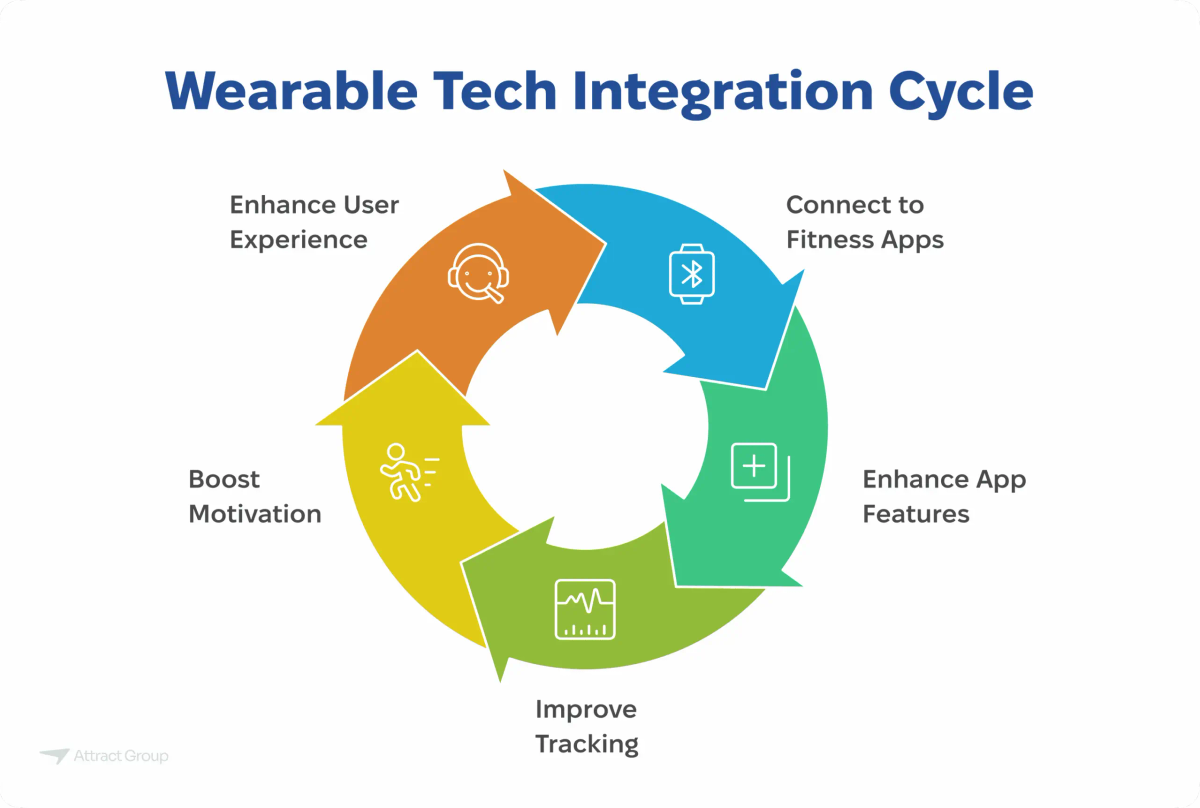
Wearable integration is now a product expectation for many workout app features. Users want their heart rate, calories, steps, and sleep data inside the app without manual entry.
Typical integrations include Apple HealthKit, Google Health Connect, Fitbit, Garmin, Oura, and Whoop. Some apps also use direct Bluetooth or SDK connections for specific devices.
The hard part is not connecting to the API. It is data normalization across devices, handling permissions gracefully, managing battery impact, ensuring sync reliability, and making the data actually useful inside the app rather than just displaying raw numbers.
For context, Attract Group built SleepTrack, a Flutter-based sleep monitoring app that synchronizes with fitness trackers and provides personalized health recommendations. That project shipped in roughly three months. Wearable sync was a core requirement from the start, which shaped architecture decisions early.
AI coaching
An AI fitness coach can adapt plans based on goals, recovery signals, exercise history, sleep quality, heart rate trends, and adherence patterns. When done well, it makes the app feel like it understands the user.
Risks are real: inaccurate recommendations, unsafe advice for users with injuries or conditions, weak personalization from insufficient data, privacy concerns around health information, and potential liability. Practical guardrails include conservative defaults, human coach escalation paths, clear disclaimers, and limiting AI suggestions to areas where the data supports them.
AI coaching is a strong differentiator but a poor MVP feature unless your entire product thesis depends on it. The data quality needed to make it work well usually requires months of user activity.
Nutrition tracking
Meal logging, macro tracking, calorie counting, and dietary goal setting. This is a full product category on its own. If nutrition is secondary to your core product, consider integrating with an existing food database API rather than building one from scratch. Barcode scanning, restaurant menus, and recipe parsing add significant scope.
Community and challenges
Social accountability drives retention. Leaderboards, group challenges, workout sharing, and community feeds give users reasons to return beyond their own motivation.
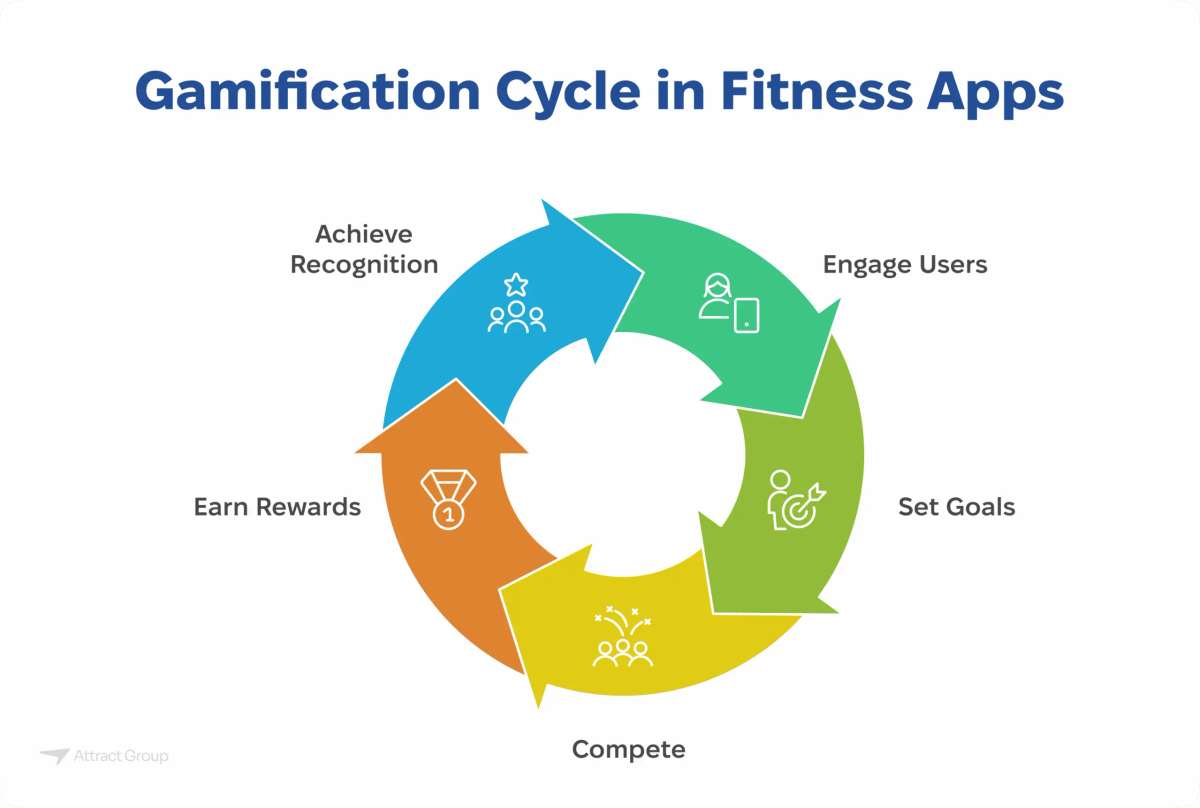
Start small. A weekly step challenge or a shared workout streak costs less to build than a full social feed and can deliver measurable retention impact.
Video and live sessions
On-demand workout videos and live-streamed classes require video hosting, streaming infrastructure, content production, and potentially instructor scheduling. This is one of the most expensive feature categories to build and maintain. If video is part of your product, budget for ongoing content production costs alongside development.
Coach or trainer chat
Direct messaging between users and coaches adds a human layer. It works well for premium tiers. Implementation ranges from simple in-app messaging to video calls. Moderation, response time expectations, and coach availability need to be designed alongside the feature.
Feature prioritization table
This table helps you scope your first release and plan subsequent phases. Adjust based on your specific product type and user job.
| Feature | MVP priority | Why it matters | Hidden complexity |
|---|---|---|---|
| Onboarding and goals | High | First impression; sets personalization baseline | Balancing brevity with data collection |
| Workout library/plans | High | Core product for most fitness apps | Content creation and curation effort |
| Tracking and logging | High | Enables progress visibility | Supporting varied exercise types and input methods |
| Progress dashboard | High | Top retention driver | Meaningful visualization across different data types |
| Reminders | Medium | Supports habit formation | Notification fatigue if poorly tuned |
| Subscriptions/payments | High (if paid model) | Revenue from day one | Platform-specific IAP rules, trial logic, churn handling |
| Admin tools | High | Operational necessity | Often underscoped; grows with content and user volume |
| Personalization (rule-based) | Medium | Reduces plan staleness | Requires clear progression logic per exercise type |
| Wearable integration | Medium | User expectation in many segments | Data normalization, permissions, sync reliability |
| AI coaching | Low for MVP | Strong differentiator when data is sufficient | Data quality, safety, liability, cost of inference |
| Nutrition tracking | Low unless core | Expands health picture | Food database licensing, barcode scanning, accuracy |
| Community/challenges | Medium | Social accountability improves retention | Moderation, empty-room problem at low user counts |
| Video/live sessions | Low for MVP | High engagement but high cost | Streaming infrastructure, content production pipeline |
| Coach chat | Low for MVP | Premium tier differentiator | Response time SLAs, coach availability, moderation |
Cost and timeline impact by feature group
Fitness app development cost varies significantly based on which features you include and how you build them. These ranges reflect 2026 market rates for professional mobile app development with a mid-tier or senior team.
Basic fitness app MVP: $25,000 to $60,000. Covers onboarding, workout library, tracking, progress dashboard, reminders, basic subscription, and admin tools. Single platform or cross-platform (Flutter/React Native). Timeline: 3 to 5 months.
Mid-tier cross-platform product: $60,000 to $150,000. Adds personalization logic, wearable integration (2-3 platforms), nutrition basics, community features, and a more polished admin panel. Timeline: 5 to 9 months.
Full product with advanced features: $100,000 to $300,000+. Includes AI coaching, video/live streaming, deep wearable integration, social feeds, multi-tier subscriptions, analytics dashboards, and robust content management. Timeline: 9 to 18 months.
Several feature categories disproportionately affect budget:
- Video and live streaming add $20,000 to $80,000+ depending on whether you use a managed service or build custom infrastructure, plus ongoing hosting and CDN costs.
- AI coaching adds $15,000 to $50,000+ for initial implementation, plus ongoing inference costs and the need for subject matter expert review of outputs.
- Wearable integration adds $5,000 to $25,000 per platform depending on API complexity and data normalization requirements.
- Social and community features add $10,000 to $40,000 depending on scope (simple challenges vs. full social feed with media sharing).
- Subscription and payment logic can be straightforward with platform IAP ($3,000 to $8,000) or complex with multi-tier pricing, corporate plans, promo codes, and Stripe integration ($10,000 to $30,000).
- Admin tooling is consistently underbudgeted. Plan for $8,000 to $25,000 for a functional content and user management system.
These ranges assume you are working with an experienced fitness app development team. Rates vary by region, team structure, and whether you use staff augmentation or a dedicated product team.
Data, privacy, and compliance decisions
Fitness apps collect sensitive personal information: body measurements, health conditions, activity patterns, location data, and sometimes biometric data from wearables. How you handle this data affects user trust, app store approval, and legal exposure.
Health data permissions. Both iOS and Android treat health data as a special category. Apple HealthKit and Google Health Connect have specific permission flows and usage policies. Your app must request only the data it needs, explain why, and handle denial gracefully.
HIPAA considerations. If your app is used by a covered entity (hospital, clinic, health plan) or you act as a business associate handling protected health information in the US, HIPAA applies. Most consumer fitness apps are not subject to HIPAA, but if you serve healthcare organizations or integrate with clinical systems, you need to evaluate this early. It affects architecture, hosting, access controls, audit logging, and vendor selection.
GDPR and data consent. If you serve users in the EU or EEA, GDPR applies regardless of where your company is based. This means explicit consent for data collection, clear privacy policies, data portability, right to deletion, and breach notification procedures.
Safety disclaimers. Fitness apps that provide exercise or nutrition recommendations should include clear disclaimers that the app does not replace medical advice. If AI generates recommendations, this becomes more important.
Data minimization. Collect only what you need. Store only what you use. Delete what users ask you to delete. This is both a compliance best practice and a trust signal.
Audit logs. For apps handling health data or operating in regulated environments, maintain logs of data access, modifications, and exports. This is a technical requirement that is easier to build in from the start than to retrofit.
These are not afterthoughts. Data and privacy decisions affect your database schema, API design, hosting choices, and third-party vendor selection. Address them during discovery, not after launch.
A build plan for a fitness app that can grow
A phased approach reduces risk and lets you validate assumptions before committing to expensive features.
Phase 1: Discovery and scoping (2 to 4 weeks)
Define the user job, competitive positioning, and feature scope. Map the core user flow. Identify technical risks (wearable APIs, content pipeline, payment model). Produce a functional specification and architecture plan.
Phase 2: Design and prototype (3 to 5 weeks)
Create wireframes and a clickable prototype of the core flow. Test with 5 to 10 target users. Validate onboarding, workout experience, and progress visibility. Refine before writing code.
Phase 3: MVP development (8 to 16 weeks)
Build the core features from the prioritization table. Ship on one or two platforms using cross-platform frameworks if budget is constrained. Integrate payments and basic analytics. Set up the admin panel.
Phase 4: Closed beta (2 to 4 weeks)
Release to a small group of real users. Measure activation (do they complete onboarding?), engagement (do they log workouts?), and retention (do they return in week 2?). Fix usability issues and data pipeline problems before public launch.
Phase 5: Public launch and iteration
Launch with a clear onboarding funnel and a plan to measure retention cohorts weekly. Add advanced features based on user behavior data, not assumptions. Wearable integration, personalization, and community features are strong candidates for the first post-launch iteration.
The SleepTrack project mentioned earlier followed a similar compressed timeline: discovery through launch in approximately three months, with wearable sync and personalized recommendations scoped from the beginning. That kind of focused scope is achievable when the user job is well-defined and the feature set is disciplined.
Frequently asked questions
What are the must-have features for a fitness app MVP? Onboarding with goal setting, a workout library or plan system, exercise tracking and logging, a progress dashboard, push notification reminders, subscription payments (if applicable), and admin tools for content management. These form the minimum viable product for most fitness app types.
How much does fitness app development cost in 2026? A basic MVP typically costs $25,000 to $60,000. A mid-tier cross-platform product runs $60,000 to $150,000. A full-featured product with AI coaching, video, wearable integration, and community features can reach $100,000 to $300,000 or more. Video, AI, and wearable integration are the features that most significantly increase budget.
How difficult is wearable integration for a fitness app? Connecting to Apple HealthKit or Google Health Connect is straightforward. The difficulty is in normalizing data across different devices, handling permissions and privacy requirements, managing sync reliability, and making the data actionable inside your app rather than just displaying it. Budget $5,000 to $25,000 per wearable platform depending on depth.
Should I include an AI coach in my fitness app MVP? Usually not. AI coaching works best when it has sufficient user data to personalize recommendations, which means it improves after users have been active for weeks or months. For most products, rule-based personalization is a better starting point. Add AI coaching in a later phase once you have the data foundation and can invest in safety guardrails and subject matter expert review.